WhatsApp chatbot for businesses
It answers, takes the order and logs it in your system.
Your team can take over the chat
 Your customer writes It builds the order It logs it The chatbot replies
One order, seen from the inside
On the left, what your customer reads. On the right, what the chatbot does in your system.
- It understands the question in the customer's own words, no number menu.
CustomerHi, do you deliver today?
- It checks your system: hours and availability.
ChatbotYes, we do today. What can we make for you?
- It groups messages that arrive in pieces before replying.
CustomerTwo house specials
and one more to go, packed separately
- It builds the order. A rules-based system stores it, not the AI model.
ChatbotDone, your order is in. Will you pay by card, bank transfer or cash?
- It collects payment: sends the payment link or the transfer details, logs the payment and alerts your team.
CustomerBank transfer
- Someone from your business writes in the chat
- The chatbot goes quiet and lets your team take over.
Your teamHi, I'll take it from here.
Sample conversation, written to show how we design it. It's not from a customer.
What it handles on your WhatsApp
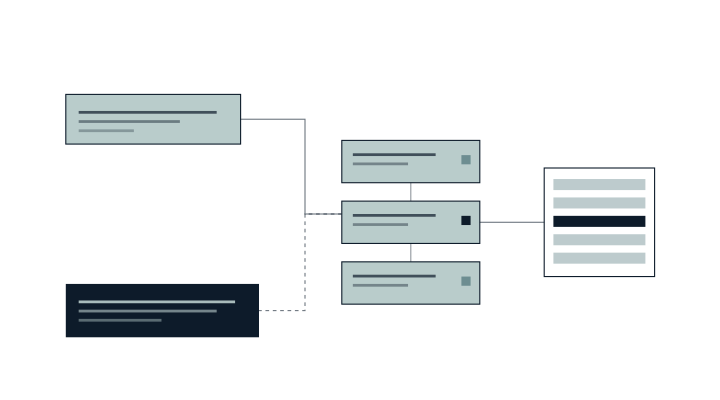
Every order goes through five stages, from the message to the delivery. You see which stage each one is in.
- Answers
Prices, availability and hours with data from your system, after hours too.
- Takes orders and appointments
Builds the order from what the customer writes and sends booking reminders.
- Collects payment
Sends the card payment link or the bank transfer details, and logs the payment.
- Alerts your team
Passes the order to the group or the person who handles it.
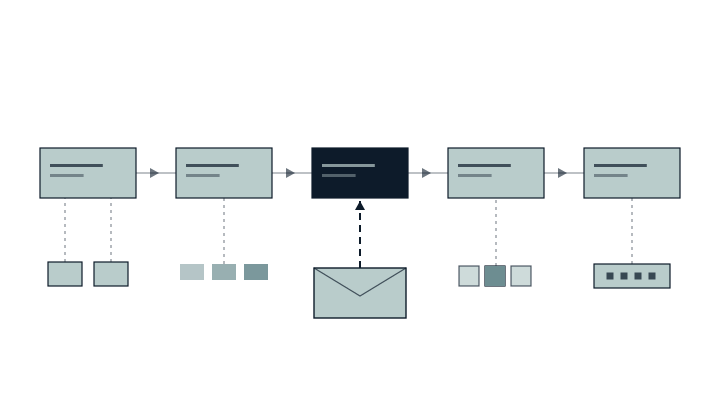 New Awaiting payment Paid Assigned Delivered Matched with the bank notice
Sample diagram: the stages of a delivery order via WhatsApp.
Option menu or AI chatbot
| Option menu | AI chatbot | |
|---|---|---|
| How your customer orders | Picks numbers | Writes in their own words |
| What it replies | Whatever the menu has | The data from your system: price, availability, hours |
| If it can't solve it | Repeats the menu | Hands the conversation to someone on your team |
WhatsApp chatbot FAQ
Do you use the official WhatsApp Business API?
In the assessment we tell you in writing which WhatsApp connection your chatbot would use and with which provider.
Can I keep replying myself?
Yes. We design it so that if someone from the business writes in the chat, the chatbot goes quiet and lets them take over. It can also hand you the conversation when the question is too complex.
Does it connect to my system?
We connect with SoftRestaurant, Oracle, HubSpot, Salesforce, Google Sheets, Gmail and SAT/CFDI, among others. If your system isn't listed, we check whether it has an API, webhooks, a database or CSV or Excel files.
What happens if something fails?
The workflow logs the error, sends you an alert via WhatsApp or email and retries. With our monthly support, we monitor your workflows.
How is it different from an option menu?
A menu makes the customer pick numbers. An AI chatbot understands what they write in their own words, looks up the data in your system and replies; if it can't solve it, it hands the conversation to a person.
How much does a WhatsApp chatbot cost?
It depends on how many systems it connects to and what the chatbot does: answer, take orders, collect payment. We give you the price after the assessment.
What do you answer by hand?
Tell us what people ask you every day and which system holds the answer. With that we prepare the assessment. We reply in under 24 hours.